 Pay4SaaS
Webhook
Webhooks are real-time notifications sent from payment providers to your server. Successful payments, subscription status changes, renewal failures — all these events are communicated to your backend via Webhooks.
How It Works
User pays → Payment provider processes → Sends Webhook → Your /api/webhooks/{provider} → Updates databasePay4SaaS has all Webhook receiving and processing logic built in — you just need to configure the Webhook URLs in your payment provider's dashboard.
Webhook Endpoints
| Provider | Endpoint | Configuration Location |
|---|---|---|
| Stripe | /api/webhooks/stripe | Stripe Dashboard → Webhooks |
| PayPal | /api/webhooks/paypal | PayPal Developer → Webhooks |
| Creem | /api/webhooks/creem | Creem Dashboard → Webhooks |
| Alipay | /api/webhooks/alipay | Alipay Open Platform → App Gateway |
Production Webhook URL format: https://yourdomain.com/api/webhooks/{provider}
Supported Events
Stripe
| Event | Purpose |
|---|---|
checkout.session.completed | Credits purchase, lifetime purchase, first subscription |
customer.subscription.created | Subscription created (active or trial) |
customer.subscription.updated | Subscription status change |
customer.subscription.deleted | Subscription canceled/expired |
invoice.paid | Subscription renewal success |
invoice.payment_failed | Subscription renewal failure |
PayPal
| Event | Purpose |
|---|---|
BILLING.SUBSCRIPTION.ACTIVATED | Subscription activated |
BILLING.SUBSCRIPTION.CANCELLED | Subscription canceled |
BILLING.SUBSCRIPTION.EXPIRED | Subscription expired |
BILLING.SUBSCRIPTION.SUSPENDED | Subscription suspended |
PAYMENT.SALE.COMPLETED | Payment completed (renewal) |
CHECKOUT.ORDER.APPROVED | One-time purchase completed |
Creem
| Event | Purpose |
|---|---|
checkout.completed | Checkout completed (credits/lifetime) |
subscription.active | Subscription activated |
subscription.trialing | Trial started |
subscription.paid | Renewal success |
subscription.canceled | Subscription canceled |
subscription.expired | Subscription expired |
Webhook Signature Verification
Each payment provider has a signature verification mechanism to prevent forged requests:
- Stripe: Uses
STRIPE_WEBHOOK_SECRETto verify thestripe-signatureheader - PayPal: Uses
PAYPAL_WEBHOOK_IDto verify via the PayPal API - Creem: Uses
CREEM_WEBHOOK_SECRETto verify the HMAC signature - Alipay: Uses certificates to verify request signatures
All of these are already implemented in their respective Webhook handlers — you just need to configure the keys.
Local Debugging
During local development, payment providers cannot directly access localhost. You need to use a tunneling tool to create a public URL.
Use ngrok — a tunneling tool that temporarily exposes your local service to the public internet so payment providers can reach your Webhook endpoint. The free tier includes 20k requests/month, more than enough for development.
Important! If you're testing payments, you must have ngrok running. Without it, the payment flow won't work — providers can't send Webhook callbacks to localhost.
Download it here: https://ngrok.com/download/.
Sign up and log in, then go to https://dashboard.ngrok.com/get-started/your-authtoken to get your token.
Unzip and run: ngrok config add-authtoken your-token, then ngrok http + your project's localhost port. You'll see something like this:
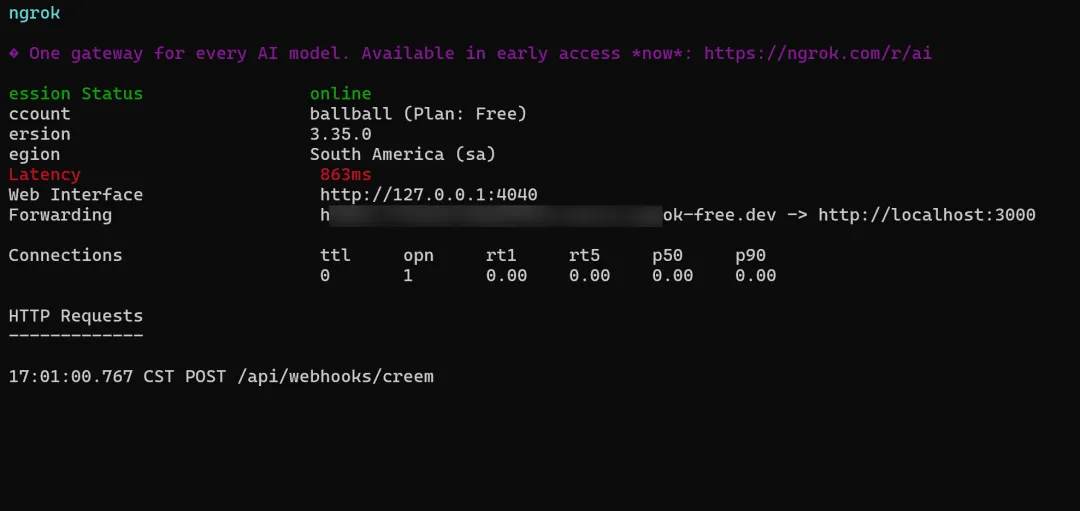
Copy the forwarding URL and use it to configure Webhooks in your payment provider's dashboard.
Using ngrok
ngrok http 3000This gives you a public URL (e.g., https://xxxx.ngrok.io), then:
- Set the Webhook URL in the payment provider's dashboard to
https://xxxx.ngrok.io/api/webhooks/{provider} - Start the project locally with
npm run dev - Trigger a payment and check the terminal logs
Important Notes
- Remember to change the Webhook URL to your production domain when going live